E Accent, A Accent and O Accent Letters: ALT Codes & Keyboard Shortcuts (Aa-Zz)
Letters With Accents: A–Z Accent Marks, Alt Codes, Keyboard Shortcuts and Copy & Paste
Letters with accents appear in hundreds of languages.Some are familiar.Others are not.
English speakers regularly encounter characters such as é, ñ, ü, ç, å, and ø in names, places, borrowed words, and foreign-language text. Other accented letters are much less common but still form an important part of written languages around the world.
At LetterAccents.com,you can find accented letters from A to Z, Windows Alt codes, keyboard shortcuts, uppercase and lowercase forms, Unicode characters, and letters that you can copy and paste directly into documents, emails, websites, and social media.
Need one letter? Jump straight to it.
Letters With Accents Chart
The letters-with-accents chart below gives a quick visual overview of common and useful accented Latin letters.
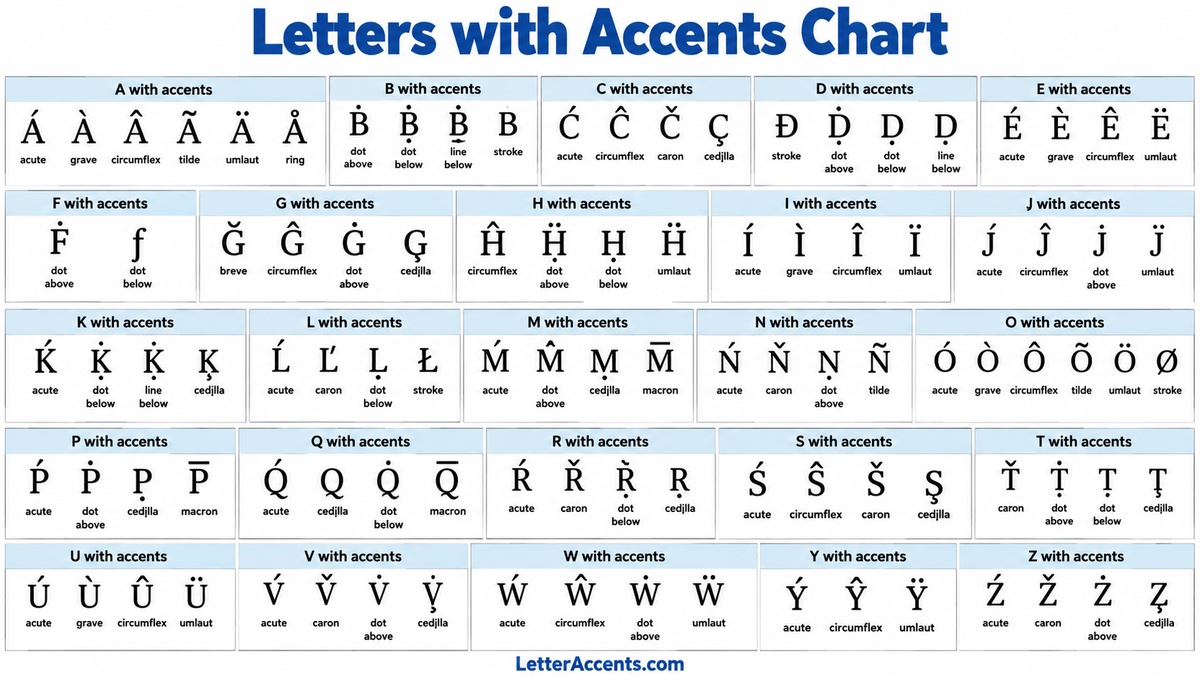
Some letters have dozens of possible diacritical combinations.
Others have very few.
For example, A, E, I, O, and U have many widely used accented forms in European languages, while letters such as Q and X rarely take accent marks in everyday Latin-script languages.
That distinction matters.
What Is a Letter With an Accent?
An accented letter is usually a base letter combined with a diacritical mark.
Examples include:
- é – e with acute accent
- è – e with grave accent
- ê – e with circumflex
- ë – e with diaeresis or umlaut
- ñ – n with tilde
- ç – c with cedilla
- š – s with caron
- å – a with ring
Small mark.
Big difference.
A diacritic can change pronunciation, distinguish one word from another, indicate stress, or represent a completely separate letter in a language’s alphabet.
Which Languages Use Letters With Accents?
Many of the world’s languages that use the Latin alphabet also use diacritics.
French commonly uses é, è, ê, ë, à, â, î, ï, ô, ù, û, ü, ÿ, and ç.
Spanish uses characters such as á, é, í, ó, ú, ü, and ñ.
Portuguese uses á, à, â, ã, é, ê, í, ó, ô, õ, and ú, among others.
German commonly uses ä, ö, and ü.
Polish uses letters including ą, ć, ę, ł, ń, ó, ś, ź, and ż.
Czech uses characters such as á, č, ď, é, ě, í, ň, ó, ř, š, ť, ú, ů, ý, and ž.
Turkish uses ç, ğ, ı, İ, ö, ş, and ü.
Vietnamese uses an especially large range of diacritics, sometimes combining more than one mark with the same vowel.
How to Type Accented Letters on Windows With Alt Codes
Windows supports classic Alt codes for many common accented characters.
The basic method is:
- Make sure Num Lock is on.
- Hold down the Alt key.
- Type the character’s numeric code using the numeric keypad.
- Release Alt.
For example:
- Alt + 0233 = é
- Alt + 0241 = ñ
- Alt + 0252 = ü
- Alt + 0231 = ç
Important.
Microsoft notes that classic Alt codes require the numeric keypad. The ordinary number row across the top of a standard keyboard does not work the same way.
What About Accented Letters Without a Traditional Alt Code?
The Latin alphabet contains far more accented characters than the old Windows character sets could accommodate.
For those characters, Microsoft Word and several Office applications support Unicode input.
Type the Unicode hexadecimal value and press Alt + X.
For example:
- 010D + Alt+X = č
- 0161 + Alt+X = š
- 017E + Alt+X = ž
- 1E03 + Alt+X = ḃ
This is different from a traditional Alt+numpad code.
Know the difference.
Another Windows Method: Windows + Period
Windows also provides a symbol panel.
Press:
Windows key + .
Then select the symbols section and browse available accented characters and special symbols.
How to Type Accented Letters on iPhone and iPad
Apple makes common accented letters especially easy.
On an iPhone or iPad:
- Open the keyboard.
- Touch and hold the ordinary letter.
- Wait for the accent choices to appear.
- Slide your finger to the character you want.
- Release.
For example, hold e and you may see options such as:
e é è ê ë ē ė ę
Choose one.
Done.
The exact choices depend on the keyboard language and iOS version.
For less common diacritical characters, you may need to add the appropriate language keyboard or copy and paste the character from LetterAccents.com.
A With Accent
The letter A has some of the most frequently used accented forms.
- á – A with acute accent. Windows: Alt+0225. iPhone/iPad: hold a and select á.
- à – A with grave accent. Windows: Alt+0224. iPhone/iPad: hold a and select à.
- â – A with circumflex. Windows: Alt+0226. iPhone/iPad: hold a and select â.
- ã – A with tilde. Windows: Alt+0227. iPhone/iPad: hold a and select ã.
The letter A also appears as ä, å, ā, ă, ą, and many additional forms.
See
A with Accent
for all A accent variations, uppercase and lowercase characters, Alt codes, keyboard shortcuts, Unicode information, and copy-and-paste versions.
B With Accent
Accented B characters are much less common in everyday Western European languages.
- ḃ – B with dot above. Word: 1E03 + Alt+X.
- ḅ – B with dot below. Word: 1E05 + Alt+X.
- ḇ – B with line below. Word: 1E07 + Alt+X.
- ƀ – B with stroke. Word: 0180 + Alt+X.
On iPhone and iPad, rare B variants may not appear on the standard English long-press menu. Add the relevant language keyboard when supported or copy the character directly.
Visit
B with Accent
to see B variations, keyboard methods, codes, and copy-and-paste characters.
C With Accent
C has several important accented forms.
- ç – C with cedilla. Windows: Alt+0231. iOS: hold c and choose ç.
- ć – C with acute accent. Word: 0107 + Alt+X.
- ĉ – C with circumflex. Word: 0109 + Alt+X.
- č – C with caron. Word: 010D + Alt+X.
For every
accented C,
see the complete list of uppercase and lowercase forms, codes, shortcuts, and copy-and-paste characters.
D With Accent
- ď – D with caron. Word: 010F + Alt+X.
- ḋ – D with dot above. Word: 1E0B + Alt+X.
- ḍ – D with dot below. Word: 1E0D + Alt+X.
- đ – D with stroke. Word: 0111 + Alt+X.
Rare D variants may require a language-specific Apple keyboard or copy and paste.
See
D accent letters
for all forms, shortcuts, codes, and copyable versions.
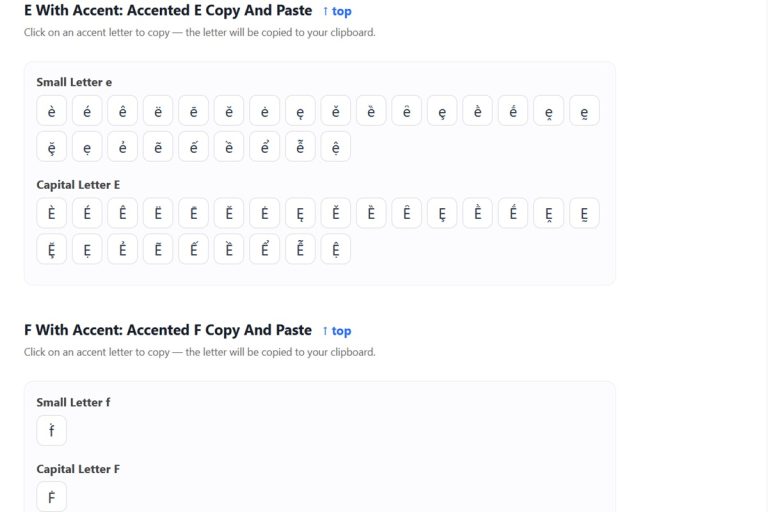
E With Accent
E is one of the most frequently accented letters in the Latin alphabet.
- é – E with acute accent. Windows: Alt+0233. iOS: hold e and select é.
- è – E with grave accent. Windows: Alt+0232. iOS: hold e and select è.
- ê – E with circumflex. Windows: Alt+0234. iOS: hold e and select ê.
- ë – E with diaeresis/umlaut. Windows: Alt+0235. iOS: hold e and select ë.
There are many more, including ē, ĕ, ė, ę, and ě.
Open
E with Accent
to see every E variation, Alt codes, keyboard shortcuts, and instant copy-and-paste options.
F With Accent
F has relatively few standard precomposed diacritical forms.
- ḟ – F with dot above. Word: 1E1F + Alt+X.
- ƒ – F with hook. Word: 0192 + Alt+X.
- f́ – F with combining acute accent.
- f̂ – F with combining circumflex.
These rarer forms may not appear through the ordinary iOS long-press menu.
See
F with Accent
for available F variants, Unicode codes, keyboard options, and characters to copy and paste.
G With Accent
- ğ – G with breve. Word: 011F + Alt+X.
- ĝ – G with circumflex. Word: 011D + Alt+X.
- ġ – G with dot above. Word: 0121 + Alt+X.
- ģ – G with cedilla. Word: 0123 + Alt+X.
Turkish uses ğ extensively, while other G variants appear in languages including Esperanto and Latvian.
See
G with Accent
for the full collection and copy-and-paste tools.
H With Accent
- ĥ – H with circumflex. Word: 0125 + Alt+X.
- ḣ – H with dot above. Word: 1E23 + Alt+X.
- ḥ – H with dot below. Word: 1E25 + Alt+X.
- ḧ – H with diaeresis. Word: 1E27 + Alt+X.
Open
H with Accent
for H variants, shortcuts, Unicode values, and copyable characters.
I With Accent
- í – I with acute. Windows: Alt+0237.
- ì – I with grave. Windows: Alt+0236.
- î – I with circumflex. Windows: Alt+0238.
- ï – I with diaeresis. Windows: Alt+0239.
On iPhone or iPad, hold i and choose the desired accent.
See
I with Accent
for additional forms such as ī, ĭ, į, ı and more.
J With Accent
- ĵ – J with circumflex. Word: 0135 + Alt+X.
- ǰ – J with caron. Word: 01F0 + Alt+X.
- ɉ – J with stroke. Word: 0249 + Alt+X.
- j́ – J with combining acute accent.
For uncommon J characters, the easiest option on iOS may be a language keyboard or copy and paste.
Visit
J with Accent
for all J variants and keyboard information.
K With Accent
- ḱ – K with acute. Word: 1E31 + Alt+X.
- ķ – K with cedilla. Word: 0137 + Alt+X.
- ǩ – K with caron. Word: 01E9 + Alt+X.
- ḳ – K with dot below. Word: 1E33 + Alt+X.
See
K with Accent
for more K forms and copy-and-paste characters.
L With Accent
- ĺ – L with acute. Word: 013A + Alt+X.
- ļ – L with cedilla. Word: 013C + Alt+X.
- ľ – L with caron. Word: 013E + Alt+X.
- ł – L with stroke. Word: 0142 + Alt+X.
Polish ł is especially common.
See
L with Accent
for uppercase and lowercase forms, shortcuts, and copying.
M With Accent
- ḿ – M with acute. Word: 1E3F + Alt+X.
- ṁ – M with dot above. Word: 1E41 + Alt+X.
- ṃ – M with dot below. Word: 1E43 + Alt+X.
- m̂ – M with combining circumflex.
See
M with Accent
for M accent marks, Unicode codes, and copyable forms.
N With Accent
N contains one of the world’s most recognizable accented letters: ñ.
- ñ – N with tilde. Windows: Alt+0241. iOS: hold n and choose ñ.
- ń – N with acute. Word: 0144 + Alt+X.
- ň – N with caron. Word: 0148 + Alt+X.
- ņ – N with cedilla. Word: 0146 + Alt+X.
Visit
N with Accent
for every common N variation, including N with tilde, codes, keyboard shortcuts, and copy-and-paste options.
O With Accent
- ó – O with acute. Windows: Alt+0243.
- ò – O with grave. Windows: Alt+0242.
- ô – O with circumflex. Windows: Alt+0244.
- õ – O with tilde. Windows: Alt+0245.
On iPhone or iPad, hold o and select the required character.
There are also ö, ø, ō, ŏ, ő and additional forms.
See
O with Accent
for the full list.
P With Accent
- ṕ – P with acute. Word: 1E55 + Alt+X.
- ṗ – P with dot above. Word: 1E57 + Alt+X.
- p̄ – P with combining macron.
- p̧ – P with combining cedilla.
P accents are uncommon, so most standard iPhone keyboards do not expose many through long press.
See
P with Accent
for codes and copyable versions.
Q With Accent
Q is unusual.
There are very few widely used precomposed Q-with-accent characters in Latin orthographies.
Unicode can still combine Q with diacritical marks:
- q́ – Q with acute.
- q̌ – Q with caron.
- q̇ – Q with dot above.
- q̃ – Q with tilde.
These are normally created using combining Unicode marks rather than a traditional Windows Alt code.
For ready-made characters and copying, see
Q with Accent.
R With Accent
- ŕ – R with acute. Word: 0155 + Alt+X.
- ř – R with caron. Word: 0159 + Alt+X.
- ŗ – R with cedilla. Word: 0157 + Alt+X.
- ṛ – R with dot below. Word: 1E5B + Alt+X.
See
R with Accent
for R accents, keyboard methods, and copy-and-paste characters.
S With Accent
- ś – S with acute. Word: 015B + Alt+X.
- ŝ – S with circumflex. Word: 015D + Alt+X.
- š – S with caron. Word: 0161 + Alt+X.
- ş – S with cedilla. Word: 015F + Alt+X.
These forms occur in languages including Polish, Czech, Slovak, Esperanto, Turkish, and others.
Visit
accented S
for the complete collection.
T With Accent
- ť – T with caron. Word: 0165 + Alt+X.
- ţ – T with cedilla. Word: 0163 + Alt+X.
- ṫ – T with dot above. Word: 1E6B + Alt+X.
- ṭ – T with dot below. Word: 1E6D + Alt+X.
See
T with Accent
for T variations and copy-and-paste shortcuts.
U With Accent
- ú – U with acute. Windows: Alt+0250.
- ù – U with grave. Windows: Alt+0249.
- û – U with circumflex. Windows: Alt+0251.
- ü – U with umlaut/diaeresis. Windows: Alt+0252.
On iPhone and iPad, hold u and select the desired version.
See
U with Accent
for additional U characters such as ū, ŭ, ů, ű, ų and more.
V With Accent
- ṽ – V with tilde. Word: 1E7D + Alt+X.
- ṿ – V with dot below. Word: 1E7F + Alt+X.
- v́ – V with combining acute.
- v̌ – V with combining caron.
Rare V variants are easier to copy than to type on many mobile keyboards.
See
V with Accent
for available forms and codes.
W With Accent
- ẃ – W with acute. Word: 1E83 + Alt+X.
- ẁ – W with grave. Word: 1E81 + Alt+X.
- ŵ – W with circumflex. Word: 0175 + Alt+X.
- ẅ – W with diaeresis. Word: 1E85 + Alt+X.
Welsh commonly uses ŵ.
Visit
W with Accent
for the full set.
X With Accent
- ẋ – X with dot above. Word: 1E8B + Alt+X.
- ẍ – X with diaeresis. Word: 1E8D + Alt+X.
- x́ – X with combining acute.
- x̂ – X with combining circumflex.
Accented X characters are unusual in modern everyday orthographies.
See
X with Accent
for X forms, codes, and copy-and-paste characters.
Y With Accent
- ý – Y with acute. Windows: Alt+0253.
- ÿ – Y with diaeresis. Windows: Alt+0255.
- ŷ – Y with circumflex. Word: 0177 + Alt+X.
- ỳ – Y with grave. Word: 1EF3 + Alt+X.
On iOS, hold y to see the versions available for the active language keyboard.
Visit
Y with Accent
for all variations.
Z With Accent
- ź – Z with acute. Word: 017A + Alt+X.
- ż – Z with dot above. Word: 017C + Alt+X.
- ž – Z with caron. Word: 017E + Alt+X.
- ẓ – Z with dot below. Word: 1E93 + Alt+X.
Polish uses both ź and ż, while ž occurs in many Central and Eastern European languages.
See
Z with Accent
for every Z variation, code, shortcut, and copy-and-paste character.
All Letters With Accents A to Z
LetterAccents.com has a dedicated guide for every letter:
- A with Accent
- B with Accent
- C with Accent
- D with Accent
- E with Accent
- F with Accent
- G with Accent
- H with Accent
- I with Accent
- J with Accent
- K with Accent
- L with Accent
- M with Accent
- N with Accent
- O with Accent
- P with Accent
- Q with Accent
- R with Accent
- S with Accent
- T with Accent
- U with Accent
- V with Accent
- W with Accent
- X with Accent
- Y with Accent
- Z with Accent
Uppercase Letters With Accents
Accented characters also have capital forms.
For example:
Á À Â Ã Ä Å
É È Ê Ë
Í Ì Î Ï
Ó Ò Ô Õ Ö
Ú Ù Û Ü
Ñ Ç Š Ž
Do not assume an accent disappears simply because the letter is capitalized.
In languages that require the diacritic, the capital normally keeps it.
Can I Just Copy and Paste Accented Letters?
Yes.
Sometimes that is the fastest method.
If you only need an unusual character once, memorizing its Unicode value or changing your keyboard layout may be unnecessary.
Open the relevant LetterAccents.com page, find the character, and copy it.
Paste it into:
- Word
- Google Docs
- WordPress
- Excel
- HTML editors
- Chat applications
- Forms
Alt Codes vs Unicode: What Is the Difference?
Traditional Windows Alt codes come from older character sets.
That is why familiar characters such as é and ñ have simple numeric codes.
Unicode is much larger.
It includes thousands of letters and diacritics used by languages from around the world.
For unusual characters, Unicode is often the better reference.
Why Doesn’t Every Accented Letter Have a Normal Alt Code?
Because classic Windows Alt codes were created long before modern Unicode included the enormous range of characters available today.
There simply were not enough positions in the older character sets.
So:
- é has an easy legacy Alt code.
- ñ has an easy legacy Alt code.
- ü has an easy legacy Alt code.
- ḃ generally requires Unicode-aware input or copy and paste.
- ṽ generally requires Unicode-aware input or copy and paste.
Perfectly normal.
How to Type Accents in Microsoft Word Without Memorizing Alt Codes
Microsoft Word provides convenient accent shortcuts.
Examples include:
- Ctrl + ‘, then a letter = acute accent: á é í ó ú
- Ctrl + `, then a letter = grave accent: à è ì ò ù
- Ctrl + Shift + ^, then a letter = circumflex: â ê î ô û
- Ctrl + Shift + ~, then a letter = tilde: ã ñ õ
- Ctrl + Shift + :, then a letter = diaeresis: ä ë ï ö ü
This can be much faster than remembering dozens of numbers.
How to Type Accents on an iPhone
Use the long-press method.
For example:
- Open Messages, Notes, Mail, Safari, or another text field.
- Touch and hold e.
- The available E variations appear.
- Slide to é.
- Release.
The same method works for many common A, C, E, I, L, N, O, S, U, Y, and Z variants depending on the installed keyboard.
How to Type Accents on an iPad
The iPad onscreen keyboard works similarly.
Touch and hold the base letter and choose the accented character from the popup.
If you use an external Apple Magic Keyboard, Apple also supports Option-key combinations on compatible keyboard layouts.
What If the Accent Doesn’t Appear on iPhone or iPad?
Add the relevant language keyboard.
Go to:
Settings → General → Keyboard → Keyboards → Add New Keyboard
A Polish, Czech, French, Spanish, Portuguese, Turkish, Vietnamese, or other language keyboard may expose characters that an English keyboard does not.
Or use the simplest option.
Copy it.
What Is an Acute Accent?
The acute accent slopes upward toward the right:
´
Examples include:
á é í ó ú ý ć ń ś ź
It is especially common in languages such as Spanish, Portuguese, Czech, Polish, Hungarian, Irish, and many others.
What Is a Grave Accent?
The grave accent slopes in the opposite direction:
`
Examples include:
à è ì ò ù ỳ
French and Italian are two familiar languages that use grave accents.
What Is a Circumflex?
The circumflex looks like a small roof:
^
Examples:
â ê î ô û ĉ ĝ ĥ ĵ ŝ ŵ ŷ
What Is a Tilde?
The tilde is the wavy mark:
~
The best-known example is Spanish:
ñ
Portuguese also uses forms such as ã and õ.
What Is an Umlaut or Diaeresis?
These are the two dots placed above a letter:
¨
Examples:
ä ë ï ö ü ÿ
The same visual mark may be described as an umlaut or diaeresis depending on its linguistic function.
What Is a Caron?
The caron looks like a small V above the letter:
ˇ
Examples include:
č ď ě ň ř š ť ž
It is particularly common in Central European languages.
What Is a Cedilla?
A cedilla is a small mark attached below a letter.
The most familiar example is:
ç
French, Portuguese, Turkish, and other languages use cedilla-like characters.
Frequently Asked Questions About Letters With Accents
How do I type é on Windows?
Hold Alt and type 0233 on the numeric keypad.
How do I type é on an iPhone?
Hold the e key and select é.
How do I type ñ on Windows?
Use Alt+0241 for lowercase ñ.
How do I type ñ on iPhone?
Touch and hold n, then select ñ.
How do I type ü?
On Windows, use Alt+0252. On iPhone or iPad, hold u and select ü.
Can I copy and paste accented letters?
Yes. Every individual A–Z page on LetterAccents.com is designed to make it easy to find and copy the character you need.
Are accented letters separate letters?
Sometimes.
It depends on the language.
In some writing systems, a diacritical version is treated as a variation of a base letter. In others, it may have a distinct position or status within the alphabet.
Where can I find every letter with an accent?
Start at
LetterAccents.com
and use the individual A through Z accent pages above.
Letters With Accents A–Z: The Bottom Line
Accented letters are everywhere.
Names. Languages. Places.
They are part of everyday written communication around the world.
For common characters such as á, é, í, ó, ú, ñ, ç, ä, ö, and ü, Windows Alt codes and the Apple long-press keyboard make typing straightforward.
For less common letters, Unicode shortcuts, language-specific keyboards, and copy-and-paste tools are often easier.
And if you cannot remember the code?
You do not have to.
Visit
LetterAccents.com,
choose the letter you need, and find all of its accented variations, uppercase and lowercase forms, Windows codes, keyboard shortcuts, and characters ready to copy and paste.